Lexie

Best Anki Alternatives in 2026

Anki is not just an app. It’s an ecosystem. The AnKing deck alone has become a shared institution for medical students. Over 84% of med students use Anki at some point during training. There are dedicated subreddits, community-maintained decks with version numbers, add-on ecosystems, YouTube channels explaining optimal settings, and students doing 700 card reviews a day like it’s a religion. Fifteen years of accumulated community knowledge lives inside Anki.

Best Anki alternatives in 2026

The algorithm is also genuinely excellent. Anki now runs FSRS, a machine-learning scheduler trained on hundreds of millions of reviews. The science is not the problem.

The problem is that Anki requires you to become an Anki person. The interface looks like it was designed as a dare. Card creation is entirely manual. The iOS app costs $25. Configuration requires watching tutorials about tutorials. And if you’re not in medicine, if you’re a high school student, a language learner, someone preparing for GCSEs or A-Levels, the community infrastructure that makes Anki worthwhile for med students doesn’t exist for you.

These six alternatives solve different problems. Some of them are good. Some of them are fine.


1. Lexie

Lexie is the answer to a question most flashcard apps don’t ask: what if the app was actually nice to use.

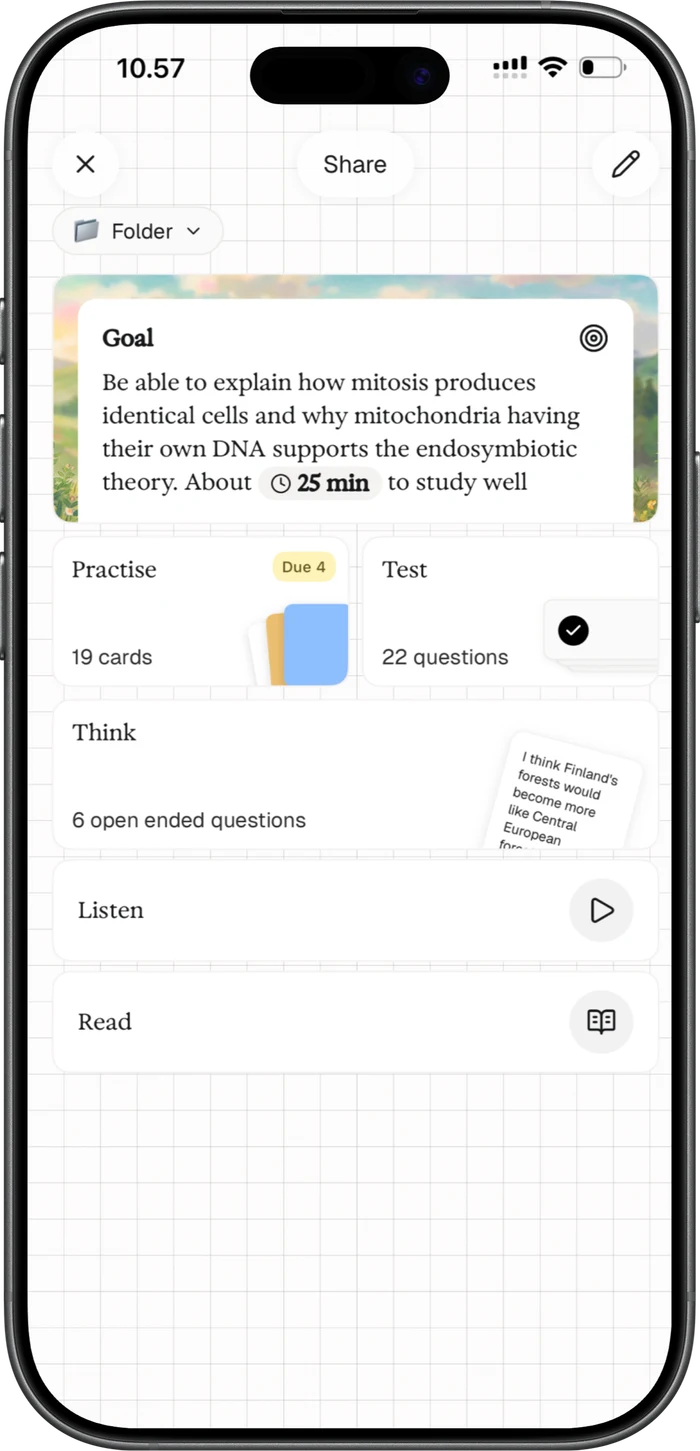
You photograph your notes, textbook, or lecture slides. Lexie generates flashcards, multiple choice, fill-in-the-blank, matching pairs, typed recall, and open-ended practice exam questions. About 30 seconds, start to finish. No card editor. No configuration. No account.

The spaced repetition runs on FSRS, the same algorithm as Anki, built in from day one, zero setup. But Lexie goes beyond flashcards in ways that matter. Practice exam questions ask you to explain a concept in your own words. AI reads your answer, gives scaffolded feedback if you’re close, shows the model answer if you’re not. Image occlusion makes you type the answer from memory before revealing the label. Not just tap to peek. That’s harder, which is the point.

The UI is where Lexie separates from everything else on this list. It’s beautiful and it doesn’t try to be your friend. No mascots. No streaks. No confetti. No AI tutor with a name and a personality asking how your day went. It’s just a smart, clean, well-designed app that assumes you’re capable of studying without being patronized.

No ads. No cloud storage of your content. Everything stays on your device. Your notes are not being used to train AI models.

Spaced repetitionFSRS, automatic, no configuration.
PriceFree (3 study sets, earn more by sharing). €9.99/month for unlimited.
PlatformsiOS, Android, Mac.
Where it falls short

No .apkg import. If you’ve spent years building Anki decks, that library stays in Anki. Lexie generates new study sets from source material. It doesn’t absorb old ones. No shared deck community (your study sets come from your own materials).

2. RemNote

RemNote is for the student who wants notes, flashcards, and a knowledge graph in one place. You write notes, tag key concepts, and RemNote generates flashcards without switching tools. Everything links bidirectionally. PDF annotation lets you make cards directly from textbook passages.

If you’ve used Roam or Obsidian, the thinking is similar, but with spaced repetition woven into the note-taking. The scheduling is solid. The integration is genuinely powerful for students managing large volumes of interconnected information across years of study.

The trade-off is that RemNote is complex in the way a cockpit is complex. If you just want to study for Thursday’s biology exam, this is several tools more than you need. If you’re building a knowledge system across four years of medical school, it might be worth the learning curve.

Spaced repetitionBuilt in, strong scheduling.
PriceFree tier is generous. Premium for offline and advanced features.
PlatformsWeb, Mac, Windows, Linux, iOS, Android.
Where it falls short

You will spend a week learning RemNote before you learn anything with RemNote. Some students never get past that week.

3. Quizlet

Quizlet is the app everyone used in high school and then either outgrew or didn’t. Over 800 million user-created study sets. For almost any course or textbook, someone has already built a deck. Multiple study modes keep review sessions varied. The interface is polished and familiar.

Quizlet added AI features recently, including a conversational tutor and card generation from uploaded notes. The Learn mode adapts to your performance, though the scheduling is not as precise as FSRS.

The problems are real. The best features are now behind a paywall. The free version keeps getting smaller. Community deck quality ranges from meticulous to someone’s unfinished homework from 2019. And the spaced repetition algorithm is weaker than what you get from Anki or any FSRS-based tool.

Spaced repetitionAdaptive Learn mode. Functional, not sophisticated.
PriceLimited free tier. $7.99/month for Plus.
PlatformsWeb, iOS, Android.
Where it falls short

The algorithm is not in the same league as FSRS. Deck quality is a coin flip. Quizlet’s priorities have visibly shifted toward monetization. The free experience erodes a little more every year.

4. Mochi

Mochi is for people who think Anki had the right idea and the wrong decade. Cards are written in Markdown. Spaced repetition is built in. The interface is clean and keyboard-driven. No AI, no community library, no gamification. You make your own cards and review them.

If you genuinely like creating cards (and the research on generation effects suggests there’s value in it), Mochi is the most pleasant environment to do it in. It imports Anki decks, so you can bring your existing library.

Spaced repetitionBuilt in, solid.
PriceFree tier. $5/month for sync and extras.
PlatformsWeb, Mac, Windows, Linux.
Where it falls short

No AI card generation. No native mobile app. If manual card creation is the part of Anki you wanted to escape, Mochi makes that process prettier but doesn’t eliminate it.

5. Brainscape

Brainscape uses Confidence-Based Repetition. You rate each card 1 to 5 based on how well you know it, and the algorithm adjusts. Different philosophy from FSRS, also research-backed.

The real value is the certified content library. Professional decks for USMLE, MCAT, Bar Exam, CPA, real estate licensing, all written by subject matter experts, not random users. If you’re preparing for a licensing exam and want curated content you can trust without building decks yourself, this is where that content lives.

Spaced repetitionConfidence-Based Repetition (CBR).
PriceFree tier. Pro at $9.99/month.
PlatformsWeb, iOS, Android.
Where it falls short

Limited customization. The algorithm is less precise than FSRS for long-term retention. If you’re not studying for a professional exam, the main selling point doesn’t apply.

6. Knowt

Knowt is free and it works. Upload notes or a PDF, get AI-generated flashcards, study with spaced repetition. No $25 iOS app. No configuration. No YouTube tutorials.

The quality ceiling is lower than everything else on this list. Card generation is inconsistent. The scheduling is basic. But for a student with no budget who needs something functional right now, Knowt removes every barrier between you and studying.

Spaced repetitionBuilt in, basic.
PriceFree. Premium available.
PlatformsWeb, iOS, Android.
Where it falls short

AI card quality is hit-or-miss. Scheduling won’t optimize your retention the way FSRS does. Limited question types. You get what you pay for.

How to pick

  • If card creation is killing you, try Lexie. If you also have no budget, try Knowt.
  • If the interface is the problem, try Lexie or Mochi. Lexie generates your cards and looks great doing it. Mochi looks great while you create your own.
  • If you need professional exam content, Brainscape has the best curated library.
  • If you want notes and cards in one system, RemNote.
  • If you need pre-made decks for a common course, Quizlet still has the largest library. Just know the best features cost money now.
  • If the algorithm is what matters most, Lexie and Anki both run FSRS. Most alternatives use simpler scheduling.

Why people stay with Anki anyway

Anki’s real moat isn’t the algorithm. It’s the community. The AnKing deck. The r/medicalschoolanki subreddit. Fifteen years of shared decks, add-ons, configuration guides, and institutional knowledge passed down between cohorts of students. For medical students especially, leaving Anki means leaving that infrastructure behind.

If you’re in that world, none of these alternatives fully replace what Anki’s community has built. If you’re not in that world, if you’re studying for GCSEs, learning a language, preparing for university exams, the community advantage doesn’t apply, and the setup cost of Anki is harder to justify.

The science doesn't change

Every app on this list uses some form of spaced repetition and active recall. Practice testing improves long-term retention significantly more than rereading or highlighting (Roediger & Karpicke, 2006; Dunlosky et al., 2013). The research on this is not ambiguous.

The difference between these apps is not whether the science works. It’s how much friction sits between you and actually doing it. The best flashcard app is the one you open tomorrow.

Lexie logo

Same study science. More practice modes. No setup.

Lexie uses FSRS spaced repetition, active recall, image occlusion with typed recall, and AI-evaluated practise exams — all generated from your own notes. 3 free study sets. No account required.